ClipGoblin

Stream → clip → scroll-stopping short. Hands-off.

ClipGoblin pulls your Twitch VODs, fuses chat spikes, audio energy, and Twitch community-clip data to find the moments that actually pop, writes AI captions and titles, and ships them to YouTube and TikTok on a schedule you control — or fully automatically.

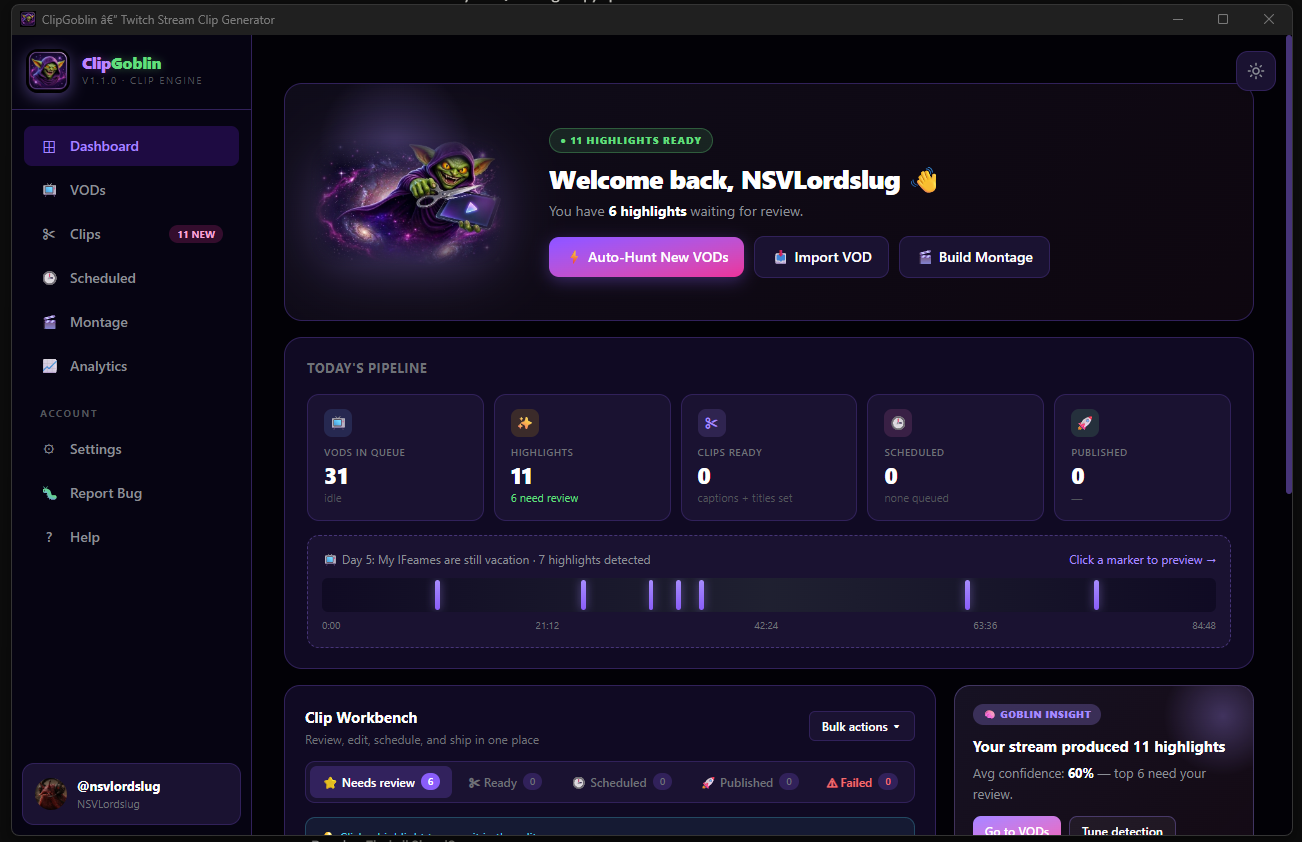
ClipGoblin Dashboard — welcome banner, today's pipeline stats, and Clip Workbench

The Dashboard — your stream scored, queued, and ready to ship.

🔥

Multi-Signal Detection

Fuses chat spikes, audio energy, scene changes, and Twitch community-clip data to rank the moments real viewers reacted to — not just loud ones.

Auto-Ship Mode

Opt in and ClipGoblin analyzes, exports, and queues uploads for every new VOD automatically. Wake up to a scheduled drop already in the pipeline.

AI Captions & Titles

Ten caption tones and six title angles, powered by Claude, GPT, Gemini, or free pattern-based templates. Bring your own key or don't — your call.

🎦

YouTube & TikTok Native

Direct publishing to both platforms with titles, hashtags, visibility, and schedule. Batch upload or drip them out across the week.

🎬

Full Clip Editor

Trim, vertical crop to 9:16, facecam placement, subtitle styles, thumbnail picker, custom captions, layout templates. All GPU-accelerated when you've got CUDA.

🔒

Runs Local, Your Keys

Everything analyses and renders on your machine. No cloud subscription, no usage caps, no data collection. Bring your own AI key, or use the free tier with zero signup.

How it works

1
Connect Twitch One-click OAuth pulls your VOD list. Or paste any public Twitch VOD URL to analyse a stream you don't own.
2
Analyse (or let it run nightly) Chat, audio, scene, and community-clip signals fuse into a ranked highlight list. Each clip gets a viral-score and detected vibe tag.
3
Polish in the editor — or skip it Trim, crop, add subtitles, pick a caption tone. Or enable Auto-Ship and let defaults handle every step for you.
4
Schedule & publish YouTube and TikTok connected in-app. Upload instantly or drip them out across the week with the built-in scheduler.

Windows desktop app. Free while in pre-release. Auto-updates once installed.

Download latest build View on GitHub
Heads-up for first-run
Beta program disclaimer & NDA please read before installing

Software status

  • Pre-release beta. Things will break. Features may change or be removed between versions.
  • Unsigned binary. Windows SmartScreen will flag it. Click More info → Run anyway. Code signing arrives with Steam distribution.
  • Provided “as-is” with no warranty on uptime, stability, or data safety.

Your data & accounts

  • Back up your work. Exports live at %APPDATA%/clipviral/exports/ — copy important files somewhere else before major updates.
  • OAuth sessions (Twitch / YouTube / TikTok) may be invalidated during development. If an upload fails, disconnect and reconnect in Settings.
  • See the Privacy Policy for data handling details.

Bug reporting

  • Use the in-app Report a Bug button — it auto-attaches logs and system info to a GitHub issue.

Confidentiality (NDA)

As a beta tester, you agree to keep the following confidential until public launch or written release from the developer:

  • Do not redistribute. Do not share the installer, download link, or tester credentials with non-testers. New testers join through official channels only.
  • Do not leak unreleased features. Screenshots, recordings, or discussion of in-development UI / features / build notes stay within the tester community.
    Exception: clips you create with ClipGoblin are yours to post publicly — that is the entire point of the app.
  • Keep bug discussion in designated channels — the in-app reporter or the official tester Discord. Not public forums.
  • No benchmark comparisons or reverse-engineering writeups without written permission. Marketing claims are managed centrally.
  • Installer license & update credentials are for your personal use as a tester only.

By downloading and installing ClipGoblin while it is in pre-release beta, you acknowledge you have read and agree to the terms above, the Terms of Service, and the Privacy Policy.